Fabric App Documentation Site
Building a documentation site with a static site generator (Zensical), served as a Fabric App via Rayfin
I decided to become one of the sheep flocking to try out Fabric Apps. For a while now I wanted something like a markdown Fabric Item, so you can host documentation directly in Fabric. From blogging I've had experience with several static site generators — they convert markdown to HTML during a build step, to generate a site that can then be hosted anywhere. So I had the Baa-rilliant idea to contribute an awesome-rayfin template that leverages the static site generator Zensical to generate a documentation site, served as a Fabric App via Rayfin.
Fabric Apps and Rayfin
So the first question Ewe'll have is — what are Fabric Apps? Fabric started out with analytics workloads, followed swiftly by transactional workloads, but the platform lacked an interface to leverage these transactional systems. Fabric Apps are a new item type in Microsoft Fabric that fills this gap, letting you build and host full web applications directly inside Fabric.
What about Rayfin? Rayfin is a Backend-as-a-Service (BaaS) platform purpose-built for creating Fabric Apps. You define your backend and frontend using code and Rayfin handles everything else: the backend APIs, authentication, storage, and deployment. The Rayfin CLI scaffolds new projects from templates, runs the local dev environment (with Docker backing the web service), and handles the rayfin up deployment step that pushes your app into your Fabric workspace.
For this template we are only using Rayfin for the static app hosting so we're not leveraging a lot of the possible capabilities, but this does mean no Fabric compute consumption.
Static Site Generators
A static site generator (SSG) takes source content — usually a folder of markdown files and a config — and produces a set of plain HTML, CSS, and JavaScript files that can be served by any web host. There is no server-side rendering at request time; the site is "pre-built" and the output is just files.
The obvious question is: why not just write raw HTML, or ask Copilot to vibe a quick page? I am of the opinion that using AI for a solved problem, where there are existing frameworks, is wasteful and a surefire way to accrue technical debt. SSGs have been around for a long time and are designed for documentation sites. The main artifact is markdown, so the repo ends up being dead simple, human-readable, and maintainable. SSGs give you a huge amount for free on top of that: structured navigation, full-text search, syntax-highlighted code blocks, and a consistent visual design. Many also support embedding raw HTML in markdown for cases where you want something more bespoke.
Zensical
Zensical is a modern SSG built from scratch in Rust and Python by the same team behind Material for MkDocs.
Key features relevant to a documentation use case:
- Live-reload dev server — changes to markdown files or the
zensical.tomlconfig are reflected in the browser instantly, no manual rebuild needed - Rich navigation — tabs, sections, breadcrumbs, instant loading, instant prefetching, and a back-to-top button out of the box
- Full-text search — client-side search with no backend required
-
Admonitions —
!!! note,!!! warning,!!! tipcallout blocksTip
Like this
-
Code blocks — syntax highlighting, line numbers, copy button, and inline annotations
-
Diagrams — Mermaid diagrams rendered natively from markdown
erDiagram CUSTOMER ||--o{ ORDER : places ORDER ||--|{ LINE-ITEM : contains CUSTOMER }|..|{ DELIVERY-ADDRESS : uses -
Icons and emojis — thousands of Material Design, FontAwesome, and Octicons icons available inline
- Light / dark mode — automatic palette toggle based on OS preference, or user-controlled /
- Math — MathJax and KaTeX support
-
Content tabs, data tables, task lists, footnotes — the full suite of extended markdown
col foo bar Hidden Sheep
Setup
Dependencies
The project needs two tools on your path:
| Tool | Purpose | Install |
|---|---|---|
| Node.js | npm/npx for the Rayfin CLI |
nodejs.org |
| Python 3 | Zensical | python.org |
Once those are present, install the two project tools:
Devcontainer (Optional)
Rather than installing anything manually, you can instead use a devcontainer definition that handles everything automatically. Open the project in VS Code and accept the Reopen in Container prompt — the base image has node, and the postCreateCommand installs Python, Rayfin CLI, and Zensical inside the container. No local toolchain changes needed, and the same definition works in a GitHub Codespace with zero local setup.
Prerequisites for devcontainer
Docker Desktop (and WSL on Windows).
{
    "name": "Rayfin Dev",
    "image": "mcr.microsoft.com/devcontainers/javascript-node:22",
    "features": {
        "ghcr.io/devcontainers/features/docker-in-docker:2": {
        "version": "latest",
        "enableNonRootDocker": "true",
        "moby": false
        },
        "ghcr.io/devcontainers/features/python:1": {
        "version": "3.13"
        }
    },
    "postCreateCommand": "npm install -g @microsoft/rayfin-cli && python3 -m pip install zensical",
    "customizations": {
        "vscode": {
        "extensions": [
            "dbaeumer.vscode-eslint",
            "esbenp.prettier-vscode",
            "ms-vscode.vscode-typescript-next",
            "GitHub.copilot",
            "GitHub.copilot-chat"
        ],
        "settings": {
            "editor.formatOnSave": true,
            "editor.defaultFormatter": "esbenp.prettier-vscode",
            "typescript.preferences.importModuleSpecifier": "relative"
        }
        }
    },
    "remoteEnv": {
        "RAYFIN_FEATURE_FLAGS": "docker-local-dev",
        "RAYFIN_WEBSERVICE_IMAGE_NAME": "ghcr.io/microsoft/rayfin/webservice:latest",
        "RAYFIN_ENCRYPTION_FALLBACK_ENABLED": "true"
    },
    "forwardPorts": [5173, 3000, 8080, 8000],
    "portsAttributes": {
        "5173": {
        "label": "Vite Dev Server",
        "onAutoForward": "openBrowser"
        },
        "3000": {
        "label": "Rayfin API"
        },
        "8080": {
        "label": "Rayfin Web Service"
        },
        "8000": {
        "label": "Zensical Dev Server",
        "onAutoForward": "openBrowser"
        }
    }
}
Prerequisites
-
Enable Fabric Apps in your tenant
A Fabric tenant administrator must enable the Fabric Apps workload before any workspace can host an app.
- Sign in to the Fabric admin portal.
- Navigate to Tenant settings.
- Under Fabric Apps (preview), toggle the setting to Enabled.
- Choose whether to apply to the entire organization or specific security groups.
- Select Apply — changes can take a few minutes to propagate.
Regional availability
Not all regions support Fabric Apps yet. Check the region availability table before proceeding.
-
Create a Fabric workspace with capacity
Fabric Apps require a workspace backed by Fabric capacity (F-SKU or Trial capacity). Create one if you don't already have one:
- In the Fabric portal, click Workspaces in the left-hand rail.
- Select New workspace, give it a name, and under Advanced assign a Fabric capacity.
- Note the workspace ID — it's the GUID in the workspace URL:
https://app.fabric.microsoft.com/groups/<workspace-id>/....
Initiate The Project
From Project
The steps below walk through using my rayfin-zensical project and deploying it as a live Fabric App.
-
Clone the repository
Ensure dependencies are installed before proceeding (see Dependencies above).
From awesome-rayfin
I've submitted a PR for a zensical-docs template to awesome-rayfin, a gallery of rayfin templates. Once the PR is accepted you can scaffold a fresh project without cloning the example repo:
-
Scaffold the project
Point the Rayfin CLI at the awesome-rayfin gallery:
-
Select
zensical-docsfrom the interactive terminal picker.
Setup
-
Initial deployment
Do a first deploy to create the Fabric App and provision static hosting.
npx rayfin login  # required on first run inside a devcontainer
npx rayfin up --workspace-id <your-workspace-id>
Rayfin reads
rayfin/rayfin.yml, runsnpm run build(the configuredbuildCommand) to produce thesite/folder, then uploads it to Fabric. After the command completes, the Fabric App item appears in your workspace. -
Capture the App URL
Open your workspace in the Fabric portal and click the new Fabric App item. In the item details panel, copy the App URL — it follows the pattern
https://<app-name>-<id>-<region>.webapp.fabricapps.net. -
Update the configuration
Set the App URL in two places:
zensical.toml— so Zensical generates correct internal links and the search index:rayfin/rayfin.yml— so Rayfin registers the URL as an allowed redirect URI for Fabric SSO:
Modifying The Site
-
Add your content
Drop your markdown files into the
docs/folder. The folder structure maps directly to the site's navigation. To define navigation explicitly, update the[project.nav]section inzensical.toml:Authoring in Zensical
Zensical has good docs on how to use all the markdown features for your pages
-
Customize the site
Edit
zensical.tomlto tailor the site to your project —site_nameis the only required setting.Customization
Update the
zensical.tomlto adjust the theme features, palette, and extensions as needed: Zensical Setup -
Iterate locally
Run the dev server with live reload:
This builds the site and serves it on
http://0.0.0.0:8000. Any change to a markdown file orzensical.tomlupdates the browser immediately. You can also do a one-off build intosite/withnpm run buildto verify the output before deploying. -
Redeploy
With the URLs and content in place, push the final site to Fabric:
npm run upcallsnpx rayfin upunder the hood. Rayfin rebuilds the site vianpm run build, then uploads the updatedsite/folder. The live Fabric App now serves your content with working navigation, search, and SSO.
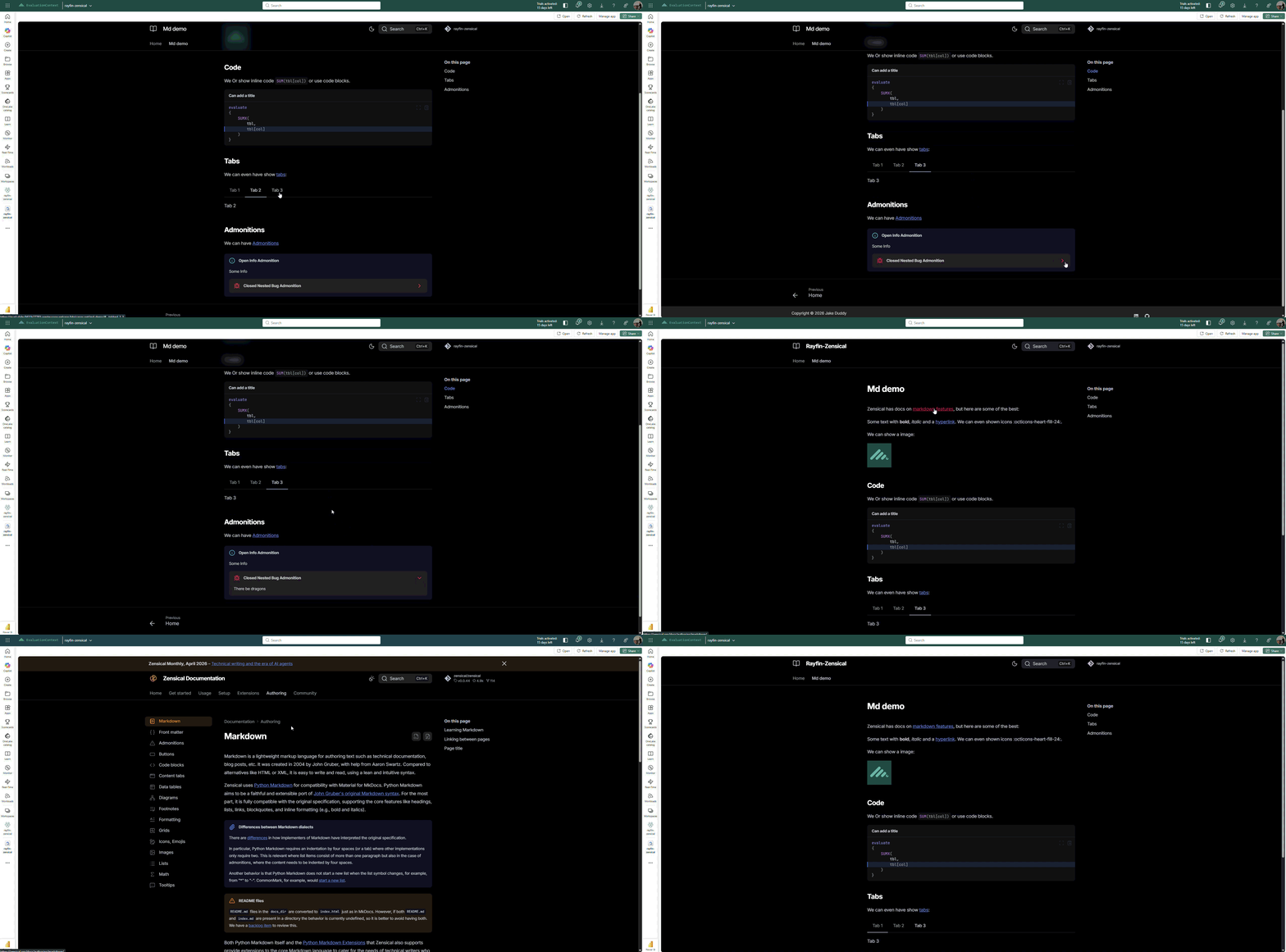
Output
Now you should have a great looking documentation site hosted in Fabric.
Conclusions
Using static site generators for documentation is a no brainer and is a good fit for:
- Product documentation sitting alongside the Lakehouse or Semantic Model it describes
- Runbooks and operational guides scoped to a workspace team
- Data dictionaries where you want rich formatting and search
- Internal standards and conventions that benefit from versioned source control in a Git-backed workspace
It would be shear madness not to check it out.